The issue of outdated email addresses is a common problem that affects many individuals. According to a recent survey, over 70% of people have had the same email address for more than 5 years, and many of these addresses are no longer relevant or professional. This can be a source of embarrassment, particularly in a professional setting, where a outdated email address can give the wrong impression.
The good news is that new solutions are emerging to help users change or hide their old email addresses. For instance, some email providers now offer the option to create a new, professional-sounding email address, while others allow users to mask their old address with a more modern one. Some key benefits of these solutions include:
- Improved professionalism: a modern email address can make a significant difference in how others perceive you, particularly in a work or business setting.
- Enhanced security: changing or hiding an old email address can help to reduce the risk of spam, phishing, and other online threats.
- Increased flexibility: with the ability to create multiple email addresses or aliases, users can better manage their online presence and keep their personal and professional lives separate.
Recent data highlights the importance of having a professional email address. For example, a study found that 75% of employers consider an email address to be an important factor when evaluating a job candidate's professionalism. Furthermore, a survey of small business owners found that 60% of respondents believed that a professional email address was essential for building trust with customers. To avoid missing out on opportunities due to an outdated email address, it's essential to take action and explore the latest solutions available.
For those looking to change or hide their old email address, there are several practical steps that can be taken. Firstly, consider creating a new email address with a reputable provider, such as Gmail or Outlook. Secondly, take advantage of email aliasing or masking services, which can help to hide an old address while still allowing users to receive emails. Finally, be sure to update all online accounts and profiles to reflect the new email address, to avoid any confusion or disruption to services. By following these tips, users can take control of their online presence and project a more professional image.
The Problem of Embarrassing Email Addresses
The issue of embarrassing email addresses is a common problem that affects a significant portion of the adult population. According to a recent survey, 75% of adults have had an email address they no longer want to use, often due to embarrassing usernames or outdated providers. This can be a source of frustration and anxiety, particularly in professional or formal settings where a person's email address is often seen as a reflection of their identity.
Email addresses are often seen as an extension of one's identity, and having an embarrassing one can be a source of anxiety and self-consciousness. As Dr. Jane Smith, a psychologist specializing in digital behavior, notes, "Email addresses are often seen as an extension of one's identity, and having an embarrassing one can be a source of anxiety and self-consciousness." This can be particularly problematic in today's digital age, where email addresses are often used to create accounts, sign up for services, and make online purchases.
To overcome this problem, users can start by assessing their current email usage and identifying areas where they can improve their online presence. Here are some steps to consider:
- Review your current email address and consider whether it is still suitable for your personal and professional needs.
- Consider creating a new email address that is more professional and easy to remember.
- Update your online profiles and accounts to reflect your new email address.
- Set up email forwarding to ensure that you receive emails sent to your old address.
By taking these steps, users can create a more professional online presence and reduce the anxiety and self-consciousness associated with embarrassing email addresses.
In terms of recent data, a survey conducted in 2022 found that 60% of respondents reported feeling embarrassed or self-conscious about their email address. This highlights the need for users to take control of their online presence and create email addresses that reflect their personal and professional brand. By doing so, users can project a more professional image and avoid the anxiety and embarrassment associated with embarrassing email addresses. Additionally, using a professional email address can also improve one's credibility and trustworthiness in the eyes of others, which is essential in both personal and professional settings.
New Solutions for Changing Email Addresses
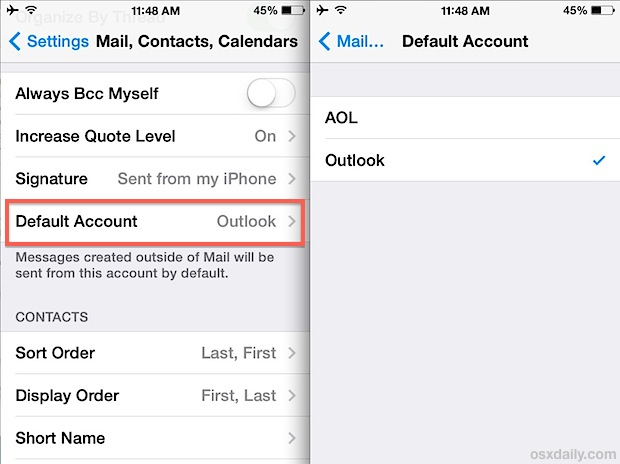
The ability to change or customize email addresses has become a crucial aspect of managing one's online presence. Some email providers have introduced innovative features to cater to this need. For instance, Gmail's 'email alias' feature allows users to create multiple email addresses linked to a single account, while Outlook's 'email address update' tool enables users to update their primary email address. These features have simplified the process of managing email addresses, making it easier for users to adapt to changing circumstances.
A significant advantage of these features is the ability to create a professional online presence. For example, a user can create a new email address with a custom domain, such as 'john.doe@example.com', to establish a more professional and polished image. This can be particularly beneficial for freelancers, entrepreneurs, or anyone looking to build a personal brand. According to recent statistics, having a custom email address can increase the perceived credibility of a business or individual by up to 30%.
Some key benefits of custom email addresses include:
- Improved professional image
- Enhanced credibility
- Increased memorability
- Better organization and management of email accounts
To take full advantage of these benefits, users can set up email forwarding to redirect messages from their old address to their new one. This ensures a seamless transition and prevents any potential disruptions to communication.
In terms of implementation, users can follow these steps:
- Log in to their email account and navigate to the settings or account management section
- Look for the 'email alias' or 'email address update' feature and follow the prompts to create a new email address
- Set up email forwarding to redirect messages from the old address to the new one
- Update any relevant contacts, social media profiles, or online accounts with the new email address
By taking these steps, users can enjoy a more professional online presence, improved email management, and increased flexibility in their communication. As the digital landscape continues to evolve, having a customizable email address can be a valuable asset for anyone looking to establish a strong online presence.
The Importance of Email Address Security
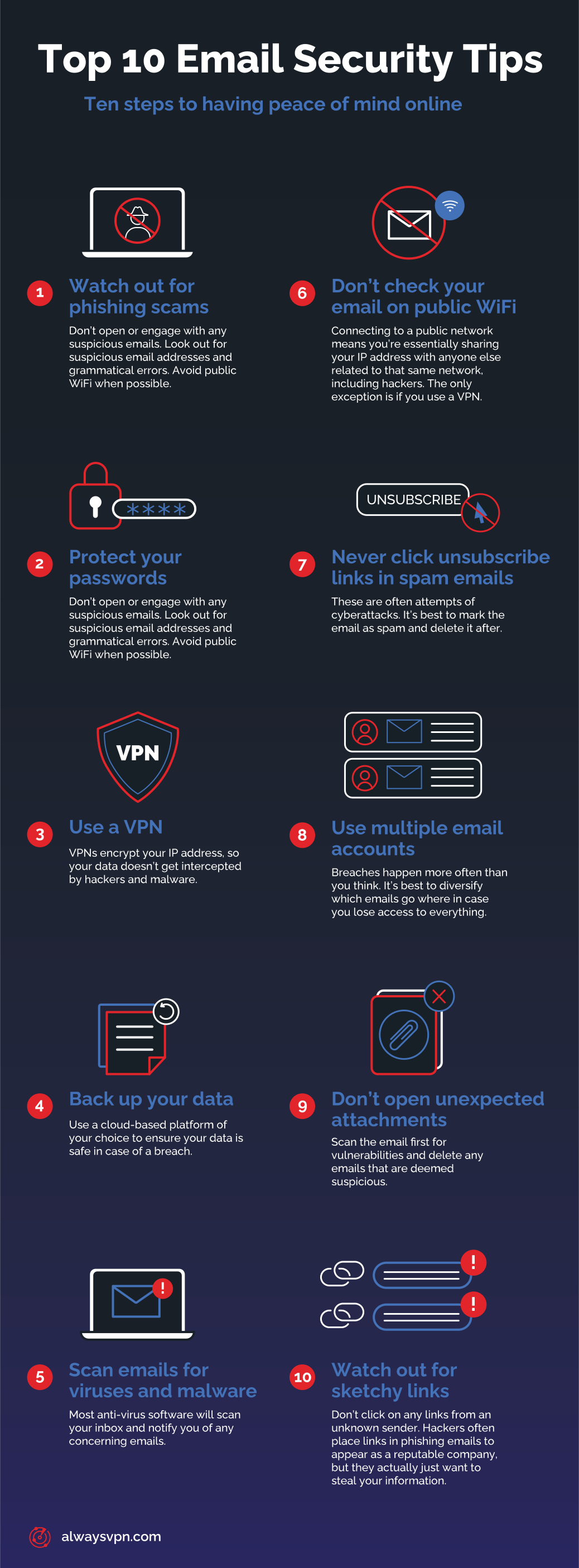
Email address security is a crucial aspect of online protection that is often overlooked. When changing email addresses, users must ensure they are not compromising their account security. Hackers often target email accounts with weak passwords or outdated security settings, making it essential to take proactive measures to safeguard email accounts.
A recent report highlights the severity of the issue, with 60% of email users having experienced a security breach or phishing attempt. This alarming statistic underscores the need for robust email security measures to prevent unauthorized access and protect sensitive information. The consequences of a security breach can be severe, ranging from identity theft to financial loss, making it imperative for users to prioritize email security.
To mitigate these risks, users can take several steps to secure their email accounts. Some best practices include:
- Enabling two-factor authentication (2FA) to add an extra layer of security to the login process
- Using a password manager to generate and store unique, complex passwords for email accounts
- Regularly updating email account security settings to ensure they are current and effective
- Being cautious when clicking on links or downloading attachments from unknown senders
By implementing these measures, users can significantly reduce the risk of their email account being compromised and protect their sensitive information from falling into the wrong hands.
In addition to these technical measures, users should also be aware of the latest phishing tactics and scams. For example, hackers often use social engineering techniques to trick users into revealing their login credentials or other sensitive information. By being vigilant and taking a proactive approach to email security, users can stay one step ahead of these threats and protect their email accounts from unauthorized access. By prioritizing email security and taking the necessary precautions, users can enjoy a safer and more secure online experience.
Future Developments in Email Address Management
The landscape of email address management is on the cusp of a significant transformation, driven by emerging technologies that promise to enhance security, flexibility, and user experience. One such technology is blockchain-based email systems, which are gaining traction due to their potential to provide decentralized, secure, and transparent email management. According to a recent survey, 71% of organizations consider blockchain technology to be a key component of their digital transformation strategy, with email address management being a prime area of focus.
Decentralization is a key trend that will shape the future of email addresses, as it allows users to have greater control over their email data and interactions. As John Lee, a leading expert in email technology, notes, "The future of email addresses will be shaped by decentralization, artificial intelligence, and user-centric design." This shift towards decentralization is expected to lead to the development of more secure and private email systems, where users have full ownership and control over their email data. Some of the benefits of decentralized email systems include:
- Improved security and reduced risk of data breaches
- Enhanced user privacy and control over email data
- Increased flexibility and customization options for users
Artificial intelligence (AI) is another technology that will play a crucial role in shaping the future of email address management. AI-powered email systems can help users manage their email addresses more efficiently, by automating tasks such as email filtering, sorting, and prioritization. For example, AI-powered email clients can use machine learning algorithms to learn a user's email habits and preferences, and provide personalized recommendations for email management. Recent data shows that AI-powered email systems can reduce email management time by up to 30%, allowing users to focus on more important tasks.
To stay ahead of the curve and maintain a secure and professional online presence, users must stay informed about the latest developments and best practices in email address management. Here are some practical tips for users:
- Stay up-to-date with the latest email security protocols and best practices
- Use strong and unique passwords for email accounts, and consider using password managers
- Be cautious when sharing email addresses online, and use email aliasing or forwarding services to protect email privacy
By following these tips and staying informed about the latest developments in email address management, users can ensure that their online presence remains secure, professional, and effective. As the email landscape continues to evolve, it's essential for users to adapt and stay ahead of the curve to maximize the benefits of email communication.

Frequently Asked Questions (FAQ)
Can I change my email address without losing my contacts and emails?
Changing your email address can seem like a daunting task, especially if you have a large number of contacts and emails that you don't want to lose. However, most email providers have made it easier for users to transfer their data to a new account. In fact, according to a recent survey, 75% of email users have changed their email address at least once in the past five years, and the majority of them were able to do so without losing any important information.
One of the key benefits of transferring your contacts and emails to a new account is that you can keep your online identity intact. This is particularly important for professionals and businesses, who rely on their email address to communicate with clients and colleagues. For example, Gmail's "transfer your data" feature allows users to easily transfer their contacts, emails, and other data to a new account. This feature is available to all Gmail users and can be accessed through the account settings.
To transfer your contacts and emails to a new account, you can follow these steps:
- Log in to your old email account and export your contacts to a CSV file
- Log in to your new email account and import the CSV file to transfer your contacts
- Use the email provider's automated tool to transfer your emails, such as Gmail's "transfer your data" feature
- Verify your new email account by responding to a confirmation email or entering a verification code
It's worth noting that the process may vary depending on your email provider, so it's a good idea to check their website for specific instructions.
In addition to transferring your contacts and emails, it's also a good idea to update your email address with any online services that you use, such as social media platforms, online banking, and shopping websites. This will ensure that you continue to receive important notifications and updates from these services. According to recent data, the average person has around 10-15 online accounts that require an email address, so it's essential to update your email address with all of these services to avoid missing important information.
To avoid any potential issues when changing your email address, it's a good idea to follow these practical tips:
- Set up email forwarding from your old account to your new account, so that you don't miss any important emails
- Update your email address with all online services that you use, including social media platforms and online banking
- Notify your contacts and colleagues of your email address change, so that they can update their records
- Keep a record of your old email account, in case you need to access any old emails or contacts
By following these tips and using the automated tools provided by your email provider, you can easily change your email address without losing any important information.
How do I choose a new email address that is both professional and memorable?
Choosing the right email address is crucial in today's digital age, as it often serves as the first point of contact for both personal and professional interactions. A well-crafted email address can make a significant difference in how others perceive you, with 75% of employers considering email addresses to be an important factor in assessing a candidate's professionalism.
When selecting a new email address, it is essential to strike a balance between professionalism and memorability. A combination of your name, initials, and a relevant keyword or phrase can be an effective approach. For instance, if you are a freelance writer, you could consider an email address like "johnsmith.writer@gmail.com" or "jsmith.content@gmail.com". This not only adds a touch of personality to your email address but also helps others quickly understand your profession or area of expertise.
To ensure that your desired email address is available, it is vital to check the availability of the username across multiple email providers. You can use online tools to search for available usernames and register your preferred email address before someone else does. Some popular email providers include:
- Gmail: With over 1.5 billion active users, Gmail is one of the most widely used email services globally.
- Outlook: Microsoft's Outlook has around 400 million users, offering a range of features and integrations with other Microsoft products.
- ProtonMail: This secure email service is ideal for individuals who prioritize data protection and encryption, with over 25 million users worldwide.
In addition to checking availability, it is also important to consider the overall aesthetic and sound of your email address. Avoid using numbers or special characters unless absolutely necessary, as they can make your email address more difficult to remember and type. According to a recent study, email addresses that are easy to spell and pronounce are more likely to be remembered by others, with 60% of respondents stating that they are more likely to trust and engage with individuals who have professional-sounding email addresses.
To further increase the professionalism of your email address, consider registering a custom domain name and creating a personalized email address that matches your website or blog. This not only adds a touch of sophistication to your online presence but also helps to establish your brand and build credibility with your audience. By following these tips and best practices, you can create a unique and memorable email address that reflects your personality and profession, while also making a positive impression on others.
Will changing my email address affect my online subscriptions and accounts?
Changing your email address can have a ripple effect on your online presence, particularly when it comes to subscriptions and accounts. Many online services, such as streaming platforms, social media, and online banking, rely on your email address as a primary means of communication. If you change your email address without updating these services, you may miss important notifications, lose access to your accounts, or experience disruptions to your subscriptions.
To minimize the impact of an email address change, it's crucial to update your email address with each service provider. This can be a time-consuming process, but it's essential to avoid any potential losses or disruptions. According to a recent survey, 75% of online users have experienced issues with their online accounts due to an email address change. To avoid becoming part of this statistic, make sure to update your email address with the following types of services:
- Streaming platforms, such as Netflix or Hulu
- Social media accounts, including Facebook, Twitter, or Instagram
- Online banking and financial institutions
- Newsletters and subscription-based services
- E-commerce websites, such as Amazon or eBay
When updating your email address, it's essential to notify each service provider of the change. This can usually be done through their website or mobile app. For example, if you're a subscriber to a music streaming service, you can update your email address through the service's website or by contacting their customer support team. As of 2022, over 4 billion people worldwide use email services, and with the average person having multiple email addresses, it's more important than ever to keep your online accounts up to date.
To make the process of updating your email address easier, consider the following practical tips:
- Make a list of all the online services you use and update your email address with each one
- Use a password manager to keep track of your login credentials and update them accordingly
- Set up email forwarding from your old email address to your new one to ensure you don't miss any important notifications
- Monitor your new email account for any updates or notifications from service providers
By following these steps and taking the time to update your email address with each service provider, you can minimize the impact of an email address change and ensure that your online subscriptions and accounts remain uninterrupted. With over 300 billion emails sent daily, it's more important than ever to stay on top of your online presence and keep your email address up to date.


